Revenue tracking
Revenue tracking lets you attach monetary values to custom event goals. Track purchases, subscriptions, or any event that generates revenue, and see total revenue, order count, and revenue over time directly in your dashboard.
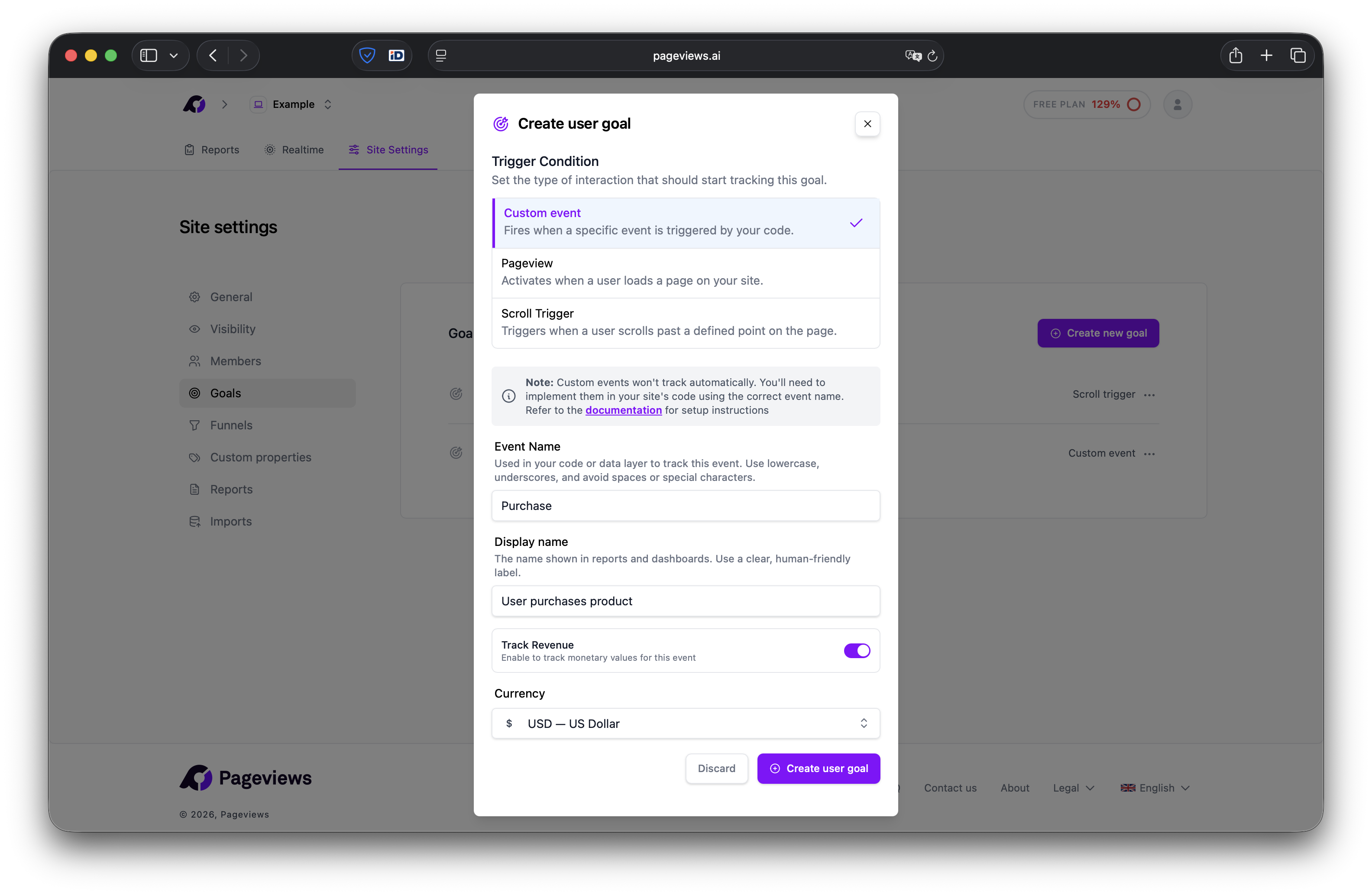
Enable revenue tracking on a goal
- Go to your Site Settings → Goals page.
- Create a new Custom Event goal (or edit an existing one).
- Toggle Track Revenue on.
- Select the currency for this goal (e.g., USD, EUR, GBP). The currency is locked after creation and cannot be changed later.
- Click Create Goal.
Send revenue data from your website
Use the revenue option when tracking events. The event name must match your goal's event name exactly.
Basic purchase event
pageviews('track', 'Purchase', { revenue: { amount: 49.99, currency: 'USD' } });Purchase with custom properties
pageviews('track', 'Purchase', {
    revenue: { amount: 49.99, currency: 'USD' },
    props: { product: 'Pro Plan', coupon: 'SAVE10' }
});
NPM module
If you're using the @pageviews/tracker NPM module:
import { track } from '@pageviews/tracker';
track('Purchase', {
    revenue: { amount: 49.99, currency: 'USD' },
    props: { product: 'Pro Plan' }
});
Revenue parameters
| Parameter | Type | Required | Description |
|---|---|---|---|
amount | Number | Yes | Positive number up to 1,000,000,000. The monetary value of the transaction. |
currency | String | Yes | ISO 4217 currency code (e.g., USD, EUR, GBP). Must match the currency set on your goal. |
Viewing revenue data
Once revenue events are flowing in, you'll see revenue data in two places:
- Overview chart — Revenue and Orders appear as tabs alongside Visitors, Pageviews, and Bounce Rate. Click them to see revenue or order count over time.
- Goal conversions — Revenue-enabled goals show total revenue and average revenue per conversion.
{screenshot: dashboard overview chart with Revenue and Orders tabs active}
Examples
Revenue tracking works with any custom event — not just purchases. Here are some common use cases:
E-commerce purchase
pageviews('track', 'Purchase', {
    revenue: { amount: 129.99, currency: 'USD' },
    props: { product: 'Running Shoes', category: 'Footwear' }
});
Subscription signup
pageviews('track', 'Subscribe', {
    revenue: { amount: 9.99, currency: 'EUR' },
    props: { plan: 'monthly' }
});
Donation
pageviews('track', 'Donate', { revenue: { amount: 25.00, currency: 'GBP' } });Tips
- The
currencyin your tracking code should match the currency you selected when creating the goal. - Events with invalid revenue data (negative amounts, missing currency) are still tracked as conversions, but the revenue is silently discarded.
- You can use custom properties alongside revenue to break down revenue by product, plan, or any other dimension.
- Revenue data supports up to 4 decimal places of precision.